Someone management position at apple.com has probably given orders so as to get new and flashy descriptions to basic actions available in all other OSes. I'm refering to the Apple Pro Tip about Copy and Delete at same time. As far as I understand, their "copy and delete at same time" action is basically called "move" in other OSes. C'mon apple, you can do better. Get some new tips up there and stop presenting old polished shoes as new ones.
31 July 2006


30 July 2006
Word Verification!!
Apparantly blogger thinks my blog is a spam blog and wants me to use word verification even to post new blog entries. Does my earlier post have anything to do with it? Have to do some research about why blogger thinks this is a spam blog. Till that time I have to go through the wretched word verification process even to post my own entries aarrrrrgghhhhhhhHHH.
Oh BTW it is not that the comments could be a cause of this as they are already protected with word verfication and a warning is there on the bottom of the page that spam comments will be deleted.
Macbookpro battery Xchange
Apple has announced a battery exchange program for the macbookpro laptops sold between February to May 2006. The affected batteries have model number A1175 and a 12-digit serial number that ends with U7SA, U7SB or U7SC. For more details go to the annoucement page and fill out the form on the right side to order an xchange.
Blogger grrrr.....
Is it only me or has blogger changed its policy of serving images to feed aggregators? I haven't been able to view any of the images of people using blogger with my feed aggregator. I have seen a couple of posts regarding the same problem on blogger help google groups. Some say this may be due to a recent maintenance. I hope this is just temporary.
Situation: a feed aggregator didn't show images for posts with blogger hosted images. Clicking on the link (every image on blogger is linked to itself or a bigger version) gave me a 404 error but typing the link addressin the URL bar shows up the image fine. Turning off http referrer in Firefox solved the problem but it is not a solution as it messes up a lot of other things and the solution is per user and not general.
C'mon google don't be so mean, you have lots and lots of bandwidth. Don't break feed aggregators reading your images.
22 July 2006
Efficiency
High Speed Connection hardware and delivery times...
Verizon highspeed 4-6 weeks
Sympatico highspeed 3-4weeks
Dataone Broadband 24hrs: priceless
19 July 2006
Bookmarklet pdoFoldToggle
There was some talk on planet.debian.org about long entries and how to fold them. Erich suggested using max-height for folding the longer entries and Daniel cooked up a hack for Firefox's userContent.css to achive the same.
And as Erich was also suggesting about a "one-liner" javascript, I cooked up the pdoFoldToggle bookmarklet to do the folding.
pdoFoldToggle bookmarklet can fold entries having a height more than 30em (can be changed by changing the value of maxH variable in the bookmarklet) and also undo the action. Hence the name pdoFoldToggle.
If you like folding the posts on planet debian, go get the bookmarlet and play with it.
17 July 2006
Quicktime - sans iTunes
For myself and those people who do not want iTunes® installed along with their Quicktime® installation: Install the standalone version of Quicktime instead i.e. Quictime without iTunes.
Standalone version of Quicktime is available from Apple.com website. They try to make the standalone download link a little difficult to spot as the combined package of Quicktime+iTunes download is plastered all over the download page!
One more thing to notice on their download page is that the link for Quicktime 7 features is dead (both win & mac versions). Why? Shouldn't the obvious link to see what features Quicktime has to offer be working? I would have filed a bug report but couldn't find a BTS link on their website ;)
16 July 2006
Google Firefox page
Isn't it a bit late to still show the Jog.com Companion extenstion for the World Cup on the Google Firefox start page?
Update: Skype Misleads
Recently I had posted about Skype home page to be a little misleading for non-windows users, espeically Linux. I don't know if they saw that post or were awaken by someone else or even just realised their own goof up but their main page now shows a link for downloading a Linux version when visiting their website using Linux. Great work, whoever did that.
That aside, they need to get their main page a little bit of more scripting to filter out information for Linux users. Why do I say this? Because the main page showed said that I could call anyone in the UK using Skype(free for the 15 and 16 July). But the Linux 1.2.0.18 version link they provide does not do that! It can't even be used to call anyone in the North America which has been free for a while and will be so till end 2006. So the kind soul who updated the main page for Linux users has some more work to do.
14 July 2006
macbook::sleep
After reading the apple-tip about making your macbook* go to sleep the fastest way, I thought why not document the various methods of getting macbook* to sleep. They are listed below:
- Click on apple icon in menu bar, choose sleep.
- apple tip: Command+Option and hold Eject button for 2seconds.
- my tip: Control+Eject, choose Sleep (or restart or just shutdown).
Enjoy the sleeping...zzzZZZZ
PS: macbook* = macbook or macbook pro
11 July 2006
MBP Photosession observation
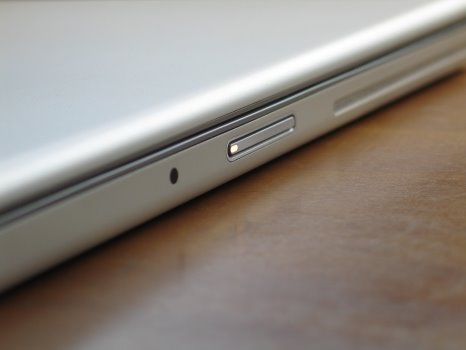
I was playing with my G5 today (not the PPC G5 but the Canon G5) and thought about doing some stills to create some desktop background images for my MBP. The stills came out nice and links to clean images, without any nasty copyright text on them, for the MBP will be put here tonight. However, before I put the images on my server here is an interesting video of what I noticed when I was observing the sleeping beauty with my digicam.
When an MBP goes to sleep, the front sleep indicator light changes its intensity so as to give a feeling of breathing rythm. That is an ingenous idea for a sleeping laptop. While the light seems to go gradually brighter and then becomes dim again, the show was a little different from the view finder of my digicam. The light goes dim and bright while going through a number of brightness levels. If you watch the video, you will see the flickering of the light as it becomes dim and then bright again. The difference comes from the fact that the light is changing the levels fast enough for the human eye to not register the different levels as they pipeline from the eye to the visual cortex is saturated. While the camera's CCD running at 15fps is able to get the flickerings due to some aliasing with the flicker rate of the light.
9 July 2006
Italiaaaaaaaaaaa
Classic display of soccer from both the French and the Italian teams. Although France's first goal lead seemed a little cheesy, but they played first class in the second half. Italy were flying in the first half after their first goal which was the first and the only "real" goal of the game. The Italians were raring to go with their headers and the French keeper Barthez did a very good job of holding them at the bay.
Both teams showed their skill with Italy more dominant in the first half and France in the second. Henry was on fire in the second half, but couldn't really convert those good moves into goals. Don't know what really prompted Zidane to butt-head Materazzi, but that was a really bad display from him considering that he is at the end of his career and is really experienced when it comes to bad mouthing/physical altercations on the field. It was bad to see him go off, but that was the right decision that the refree made. I understand that Barthez was sad at not winning the shootout and hence the cup, but he did as good a job as his Italian counterpart. It was only that David Trezuguet was unlucky to the bar instead of hitting home. Well, some days are like that.
Congrats to the Italians for the win. It was a game of wits in the end. Both the keepers were fantastic. Had not be for them, the game would have finished atleast 2-2. In the end I can say again that it was a fantastic display of soccer (sans a couple of bad events). Now the wait starts for the next World Cup in the worderful South Africa.... just 4 years to go.
PS: BTW, the match was held at Olympastadion, Berlin which was the place for the 1936 Olympics too.
5 July 2006
France to see Italy
Just finished watching the wonderful semi-final game between France and Portugal. France won 1 - 0. Had it not been the foul inside the penalty area by Portugal the match might have gone to extra time. France now meets Italy in the final on Sunday.
Although Portugal was the losing team, France didn't win convincingly. Portugal played better than France overall. Their passing skills were great and they were able to create attacks by stealing the ball from the French. C. Ronaldo tried his best, but I don't know how much he could have done with 3 defenders on him almost all the time. Miguel's loss was bad luck for Protugal, but I think sending Simao in earlier could have helped taking off pressure and defenders off Ronaldo. I don't know how but when Ronaldo took the free kick in the second half, I had a feeling he was going to "Bend it like Beckham". It was a wonderful kick which dropped suddenly and caught Barthez with a bit of surprise.
Overall Portugal seemed to be the better side but had a unlucky day. The match was more or less a fair game with only two yellow cards. France played well but the onus goes to the defenders who kept the Portugese at a distance. Now they meet Italy in the Final on Sunday. But hey, don't forget the interesting game between Germany and Portugal for the 3rd position.
4 July 2006
Gooooooooooooal
Watched the Germany v/s Italy semi final World Cup game. Italy won 2-0 with both goals scored in the last 2minuts of the extra time. The game was fantastic display of skill without too much of foul play. Now to see who they have to play in the final....France...or Portugal...
Skype misleads
Skype as you most probably know is a software which offers voice over IP communication along with an instant messaging feature. Skype has improved a lot with additional features such as video chat being introduced in the Windows version. However, they seem to have forgotten the Linux user base. The last public release version (1.2.0.18) was released on 25th October 2005!
That aside I was surprised to see that Skype website indicates that version 2.5 is available for download without any indication of the operating system required. Apparently, version 2.5 is only for Windows® whereas versions for OS X and Linux fall far behind. It is only when you click the "Download" button on the main page that you realise that Skype for Linux is version 1.2.0.18 (and a very late 1.3.0.30 beta) and version 1.4.0.40 for OS X.
Skype website sniffs the operating system that the visitor's computer is using and then redirects to the appropriate download page. This sniffing process should have been done on the main page so that appropriate information regarding the version available for the visitor's PC's OS is displayed. Displaying version as 2.5 without checking if that is available for that system is misleading the users. Mozilla.com website does this kind of sniffing efficiently and gives you an appropriate link for the version your OS needs. It looks like everyone at Skype is busy enhancing the application for Windows users without caring much for OSX and Linux userbase or even the website for those users!!
28 June 2006
Mumbling....Mac OS X...grrr
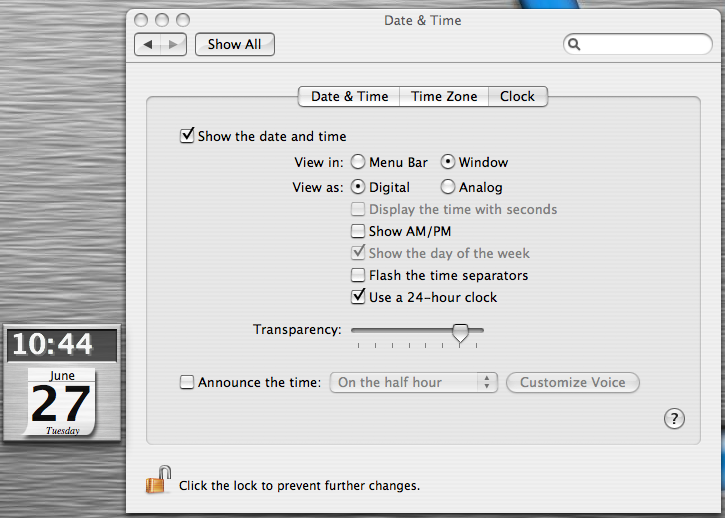
Mac OS X got upgraded to 10.4.7 today. The update page starts with the text "Meet the world's most advanced operating system. Again. Instantly find what you’re looking for. Get information in an instant ....". I have been trying to get the inbuilt clock to show the time in 24hr format (in window mode and not in menubar on top right). And this most advanced OS can't do the simple job of showing me time in 24hr. If I check the Use 24hr clock option not only it continues to show time in 12hr format, but the option to show the AM/PM indicators is also available!
I don't know how they rated OS X as the most advanced OS but I do know that my Linux box has no problem showing time in 24hr format and neither does the lame Windoze XP! Apple, should I expect a 10.4.8 update to get this easy functionality in OS X?
27 June 2006
Bell+Domain Name Registration
I stumbed upon Bell.ca domain name registration page from one of those enticing google advertisements. I was surprised to see that Bell also offered domain name registrations. So out of curiosity I went browsing around to find what they charge for the domains. I think Bell is full of surprises as the domain name pricing on their website was a huge surprised. They charge CAD30+tx (atleast 34.50) for .ca, .us, .com, .net, and .org domains! You can easily browse around for domain name registrars and find a few which will offer much better prices with some where you can buy the domain name for around 4 years with the amount you would pay Bell!
Bell does not seem to believe in bulk selling discounts. They will charge you the same CA$30*10 = CA$300 if you register your domain name through them for 10 years. The biggest surprise was that of the pricing of the .info domains. Registring a .info domain for 1 year costs CA$60! I wonder who would to and register a .info domain with them when 1&1& is giving it away for free. Go get one now, only a few days left.
26 June 2006
Silencing your PC
Over the last few weeks I had noticed somewhat unusually loud humm coming from my desktop personal computer (PC). I thought it might due to the warm weather and the PC being running all the time. It runs 24/7 due to the fact that it also run apache and hence is my web server. As it had been more than a few months, I thought giving it a good cleaning session wouldn't hurt. After I was done, I was pleasently surprised! The loud humm was almost inaudible thanks to the cleaning routine I used. Read below how to keep your computer's temperature down and reduce the noise it creats with adding any additional hardware.
Before we start with the details of how to clean the PC, consider this as a warning that if you do not know how to open it up and dismantle its parts do seek the help of an experienced friend. You should be careful when touching different parts of the PC as there is always a change of getting an electrical shock. The most important thing to take care is that the PC should be grounded at all times as a precautionary measure in case you touch a live wire or if there is a discharge of static charge. Grounding of the PC can be achieved by keeping the power cable attached to the PC and turning the power supply switch to OFF position.
Tools Needed
- Ear buds (Qtips)
- A fat(#10 - #12) sable hair brush (for fans)
- Vacuum cleaner
- Screw driver (usually philps head)
- compressed air can (if you don't care about dust flying and settling around you)
Cleaning the Case
Open up the computer case and carefully suck the dust from the body of the case without touching the components of the computer. Most important places are the crevices besides the CD/DVD/floppy drives and any air flow vents on the front panel. Back panel vents should also be cleaned by sucking all dust from there. This cleaning is important because it helps the air flow from the inlet (usually front panel) to the outlet (back panel).
Processor Fan
The processor fan is THE fan which keeps your computer running all the time. If that dies (usually due to dust), the CPU temperature will rise as heat dissipation due to forced cooling by the fan is absent and the computer will stall when the temperature rises above a certain limit. Take out the fan by disconnecting its cable from the motherboard and clean it with the brush and keep the vacuum cleaner running near it to suck all dust. When you are done, there should be no dust sticking on the fins or the frame of the brushless DC fan. Before putting the fan and the housing back in its place, carefully suck the dust if any from the heat sink attached to the CPU. Dust is a bad conductor of heat and hence should not be left on the heat sink or for that matter anywhere on the motherboard or other devices.
Power Supply Fan
Be very careful while opening the power supply. Make sure you disconnect it from the mains when opening it up. The power supply fan should also be cleaned the same way you cleaned the CPU fan so that there is not dust on the fan. Also check the grill in front of the fan and make sure it is dust free. Suck dust if any from the power supply unit if any. Below you can see the images for the power supply fan (before and after cleaning).
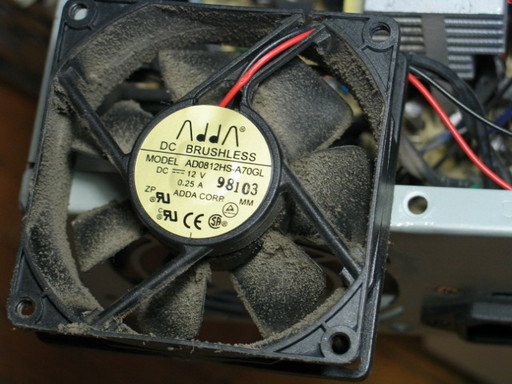 Power Supply fan - Before
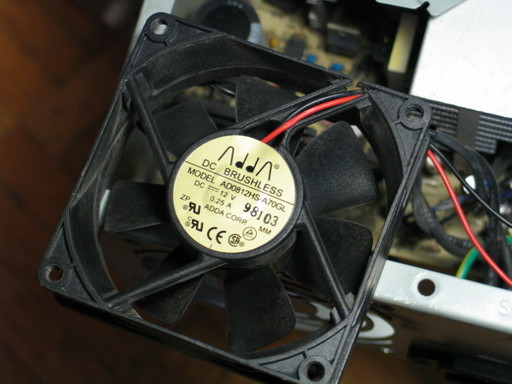 Power Supply fan - After
VGA Card Fan
These days the video cards usually have a fan seated on the video processor. If you see a lot of dust on the fan, think about cleaning it up but carefully. Cleaning the video card fan is the most demanding task in this routine. I say that because you will have to take the video card out and then unscrew the delicate fan from the top of the processor. As VRAM chips are present near the video processor, you might accidently hose your card if you have static charge. When you are done cleaning and remounting the fan, use the ear buds to clean the dust around the video processor carefully.
Reconnect all the components and wires that you disconnected during the cleaning process and close the PC. Boot it up after connecting the peripherals and compare the sounds the fans make after the computer runs for about an hour or so. You should also make sure that there is ample space around the PC so as to give it ample "air to breath".
What we have accomplished here is that we have made the air flow path as clear as possible by cleaning the case. The fans in the cleaned state are more efficient. Dust on the fans decrease the air flow and hence slows the cooling. As a result, the computer tries to increase the speed of the CPU fan. Increased speeds lead to more wear and tear of the fan and also produces a louder humm. Dust is also the leading cause of failing fans and hence removing it is in our favour.
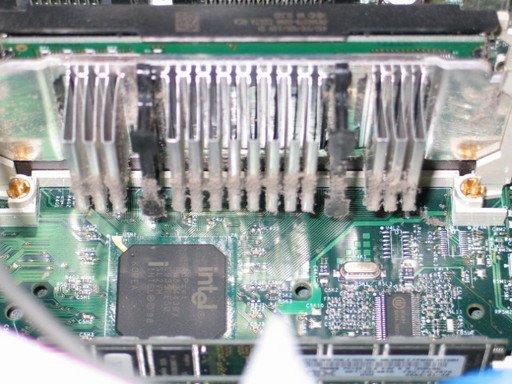 CPU Heat Sink - Before
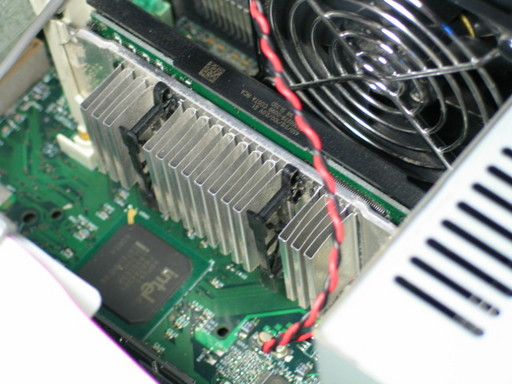 CPU Heat Sink - After
A layer of dust on the heat sink acts as an insulator and hence reduced the heat loss. Removing the dust from the heat sink as is important as from the fans. But in case you want to fry the processor, you could leave it on ;)
After following the above process, the humm created by my PC was reduced so much that I had to go and place my ear near its back panel. The cleaning process should be repeated every 3 or 4 months to keep the computer working efficiently. People do keep their places clean but forget about their PCs. PCs need cleaning as much as your household so as to keep them in proper working condition.
I wonder how I will sleep tonight will the reduced amount of humm to keep other noises masked during the night!
23 June 2006


22 June 2006
Subscribe to:
Posts (Atom)